
Best New Year’s Resolution Idea: resolve to be organized.

Try a New Year’s resolution you can keep this year. Resolve to be more organized in 2013. Office Ink shows you a few ways to keep that resolution.

Declutter your desk with desk files.

Can’t see your desk for all the paperwork, files and memos? Get yourself a step file and a few colored file folders and declutter your desk. 3 ring binders are another great solution for desk clutter. Armed with a stack of binders, a hole punch, some index tabs and sheet protectors, your can clear the clutter from any desk. More tips on decluttering a messy office desk here.

Free up file cabinet space with file storage boxes.

Are you devoting a lot of your file cabinet space to storing files your rarely need to reference, but can’t throw away? Free up cabinet space by shifting old files to file storage boxes. Archive old file storage boxes

Organize files with a color coding.

Group your files into major categories, then assign each group a file folder color. Color coding makes filing and retrieving documents go a lot faster. Check out our previous post for more information on setting up a color coded filing system.

Add storage with a new file cabinet or two.

Of course, sometimes you just have to break down and buy a new file cabinet. Use our guide to find the right file cabinet  size and style for your office.

Manage your time with productivity apps.

Once you’ve taken control of your files, take control of your day. There are a ton of apps out that help you better manage your time. EasyTask Manager is a great free app. Check out our guide to the best productivity apps and start accomplishing more in a day.
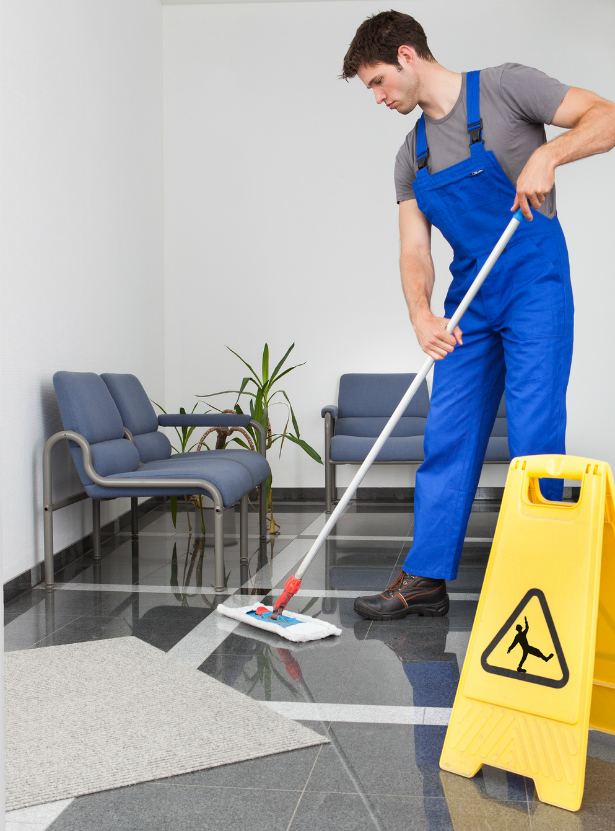

Tip: Use Microfiber Mop & Ammonia to Clean Salt Residue on Floors.

tip-use-microfiber-mop-ammonia-to-clean-salt-residue-on-floors

With winter snows and ice comes salt. And with salted parking lots, walk ways and door ways comes the ugly salt residue on your floors. Worse still, salt is not only unsightly, it’s corrosive. Regular cleaning is essential to protect your floors through the long winter months.

Best mop for cleaning up salt & snow melt.

Microfiber mops are your best choice for cleaning messy winter floors. They are the most absorbent, so you’ll actually pick up the dirty water  instead of spreading it around and pushing it into grout.  Don’t have a microfiber mop? Use a few towels to dry your floors after mopping. You’ll never get rid of the residue if you allow your floors to air dry.

Best floor cleaner for salt & snow melt.

Ammonia-based floor cleaners do the best job of cleaning up that ugly white salt residue left on floors. Ammonia neutralizes, or lowers the pH level of salt. This halts the corrosive effects, and dissolve the chemical bond between the salt and your floor.  To make your own floor cleaning solution, use two tablespoons of ammonia and one tablespoon of borax for every one gallon of water.

Clean salt residue from your floors as soon as possible. Salt destroys floor finishes, first creating a sticky mess that attracts dirt before dissolving completely.

Sources: The Cleanest Image, How To Clean Stuff.Net

Naked Santa Worst Office Holiday Party Idea Ever

naked-santa-worst-office-holiday-party-idea-ever

Our small staff here at OnTimeSupplies.com is spread out all over the country (and in one case lives on the other side of world). So we don’t do holiday parties. There are a lot of perks that with this set up, but I’m a little jealous of those of you that get to celebrate the holidays with your coworkers.  So, I want to personally thank CBS for posting this roundup of the worst office holiday parties ever. Schadenfreude feels so much better than envy! They are all hilarious, but this anecdote is by far my favorite:

The Naked Santa Surprise

“I worked at a great advertising agency in Rochester, New York called Rumrill-Hoyt. On good years we had extravagant holiday parties [but] the very best party came during a lean year. A down-trodden looking Santa was working the crowd, handing out drink chits. ‘Alvin and the Three Chipmunks,’ supplied by a clueless DJ, were discouraging the dancers. Without warning, the Santa, resplendent with handmade tattoos, stripped to a dirty jock strap, leapt onto a table and began bumping and grinding to the tunes coming out of a tiny tape recorder near his feet. [We] were slack-jawed and the room fell silent. The morning after the Santa show, [my boss] called all of the usual suspects into his office. None confessed to the crime of tastelessness. Turns out some newly hired, low-level assistant got stuck with planning the not very grand party, and when the party house manager offered to throw in a “naked Santa” for $50, it seemed like a good idea. Friends and I still talk about the naked Santa. A truly genuine surprise [is] the best gift of all.”

Moral of the story: pick your party planner wisely! Most of the other holiday party stories featured probably started like this:

Got a funny office holiday party story, booze-fueled or otherwise? Share it in the comments!

Source: Office holiday parties gone wild: Crazy true stories

Best Productivity Apps for iPhone & Other Devices

best-productivity-apps-for-iphone-other-devices

Interested in task tracking software to help you get more done in a day? Check out our guide to the best productivity apps for iPhones and other devices.

EasyTask Manager

EasyTask Manager offers free task tracking software for smartphones, Macs and PCs, and  allows syncing with multiple devices. Use it to set up to-do lists, prioritize tasks and schedule appointments.
Cost: Free

Checklist Wrangler
Checklist Wrangler lets you create flexible checklists on iPhones & other Apple devices. The great strength of  Checklist Wrangler’s task tracking software is its flexibility. You can use it to maintain supply lists, track household chores, set reminders & more. Plus, you can schedule your checklists in various time increments, and quickly email them to anyone.
Cost: 99¢

Things
At fifty bucks, Things is pretty pricey for a productivity app, but there are several features may make it worth the money. Things  is designed to help your manage day to day tasks and long term goals. Quickly input tasks, create daily checklists, view upcoming tasks, schedule  prioritize assignments, schedule appointments & due dates and more so you can stay on top of all your responsibilities. Things’ task tracking software is very flexible. For example, the “Don’t Show In Today” allows you to push tasks into the next day’s to-do list. You can combine tasks into projects.
Cost: $49.99

ToodleDo
ToodleDo is a customizable productivity app that you can expand as needed. The basic $3 app allows you to create to-do list, schedule and priortize tasks, import data from other time management apps and sync across a variety of devices and platforms. There’s even a geo-tagging feature that alerts you when your near the site of an item on your task list.
Cost: $2.99

Do you use a productivity app not featured in this list? Tell us about it and we may feature it in an upcoming post.

Source: HowStuffWorks, Intuit Small Business Blog

5 tips for giving the best office holiday gifts

Want to be the best office Santa?  Here are 5 things to keep in mind when shopping for the perfect holiday gift for the office.

Be a cheapskate.

Lavish gifts are inappropriate for the workplace, and embarrassing to receive. You are just trying to be nice and spread a little cheer, not make their whole year.

Make it personal, but not too personal.

Your gift should show that you think well of your recipient, cross the line into impropriety. I think the best office holiday gifts are items that can be used at work, such as a nice pen set or personal organizer.  Baked goods and a store gift cards are other great options.

Don’t forget your assistant.

It’s always a good idea to show your appreciation for support staff.

Be discrete.

If you aren’t buying gifts for the whole office, be discrete with your gift-giving. Lunch is a great time to exchange gifts.

No gag gifts. 

Why take the risk of giving offense? A small, sincere gift is always the way to go. Save the gags for your frat brothers.

Getting to Know OnTimeSupplies.com; Part V in Series

Sridhar Balasubramanian, Co-Founder & Chief Technical Officer at OnTimeSupplies.com

We’re introducing one of the bigwigs at OnTimeSupplies.com today, co-founder and Chief Technical Officer Sridhar Balasubramanian.  I know him as Sri, the nice guy who helps me with everything from navigating WordPress to picking out a new laptop (thanks Sri, the Lenovo is working out great!)  But apparently, being CTO involves a bit more than that! Today, Sri tells us how the business has changed over the last eight years, shares his tips for working from home, and reveals his favorite office supplies.

How has your job changed since you started OTS?
The internet has evolved a lot and has become more complex. It is a challenge to keep up with new trends and technologies and stay fresh and current with our customers.

What does your current job entail?
I handle all things tech: developing new features for our website and our backend systems, and keeping the website running smoothly.

What’s your favorite part of the job?
Having the freedom to get ideas implemented without red tape, and having flexible working hours.

What’s your favorite/handiest office supply?
Post-it Notes: I use them to set reminders and make lists!

Do you have any tips for other people working from home?
Unlike in an office, you can’t work till closing time or for the weekend. You have to be more project oriented and set goals in order to stay focused. You also have to reward yourself when you achieve your goal, whether it’s a gift for yourself or a vacation to somewhere fun.

Anything you wish to add?
Despite the ups and downs, this is the greatest job I’ve ever had. I enjoy working with the amazing employees, having the freedom to set my own schedule and gaining self-satisfaction from getting my work done.

Video: improve office ergonomics with diy exercise equipment.

https://www.google.com/sorry/index?continue=https://www.youtube.com/watch%3Fv%3DMHTb1GAR534%26hd%3D1&q=EhAmADwAAAAAAPA8kf_-OlQIGN2S-4AGIhkA8aeDSwu275M00-gt2j_XXoutdBwCJixCMgFy

The dangers of sitting all day at work are well known at this point: increased BMI and mortality, as well as stress and discomfort in the lower back, shoulders and neck. A good ergonomic desk mitigates those dangers, as can a standing desk. But the best thing you can do to improve the ergonomics in your office is take the sedentary out of your sedentary job and add some activity to your day. You can start by taking periodic breaks to stand up, walk around and stretch.  In this video, green-building pioneer Lloyd Kahn shows you how to take it to the next level and rig up an in office gym with little more than rope and a few exercise bands.

I love the ideas in this video, but not everyone has the space or the ability to turn their office into a gym. Luckily, there plenty of exercises you can do in your office that don’t require any equipment, and won’t rumple your clothes.

Lloyd Kahn’s Office Gym via Lifehacker

Vertical vs. Lateral File Cabinets: a quick guide to upgrading your file storage system.

We posted a file cabinet buying guide a couple years (and a name-change) ago. We’ve gotten a few requests during that time to update and streamline the post. Office Ink aims to please. So here are we are with the highlights: a quick guide to office file cabinets.

Lateral File Cabinets: best for small offices; frequently accessed files.

Horizontal lateral files are take up little interior space, so they are the best choice for small offices. Lateral file cabinets are available in a wide range of widths and heights. You can get lateral files big enough to divide a room, small enough to fit under your desk, or sized just right to to do double-duty as a new work surface.

 basyx Vertical File Cabinet

Vertical File Cabinets: best for small offices; less frequently accessed files.

Vertical cabinets take up less wall space than lateral files, but they are too deep and bulky for small work areas. However, vertical file cabinets provide a ton of file storage. Use them to archive files you don’t need to get at every day.

Metal Cabinets: best for busy offices.

Metal file cabinets can take a lot of abuse, so they are best for choice for frequently accessed files.

Wood Cabinets: best for home and private offices.

Wood cabinets are usually more attractive than metal options, and relatively more expensive. However, they are a beautiful option if you don’t need to store a million file folders. Use them in your home office, or in a private office.

Check out the previously posted buying guide for a more in-depth look at your file cabinet options.

Use your smartphone to network during your daily commute.

Take public transportation to work? While you’re avoiding eye contact with your fellow commuters, take the time to cross a few items off your to-do list, and do a little networking. Thanks to smartphones, your commute is the perfect time to read and answer email, update your LinkedIn profile, schedule meetings and more. Another great idea: use the time to catch up on industry articles and podcasts.

Check out Pendaflex’s Beyond Folders Blog for more great ideas on having a great commute.